
IT Risk Management and Compliance for Higher Education

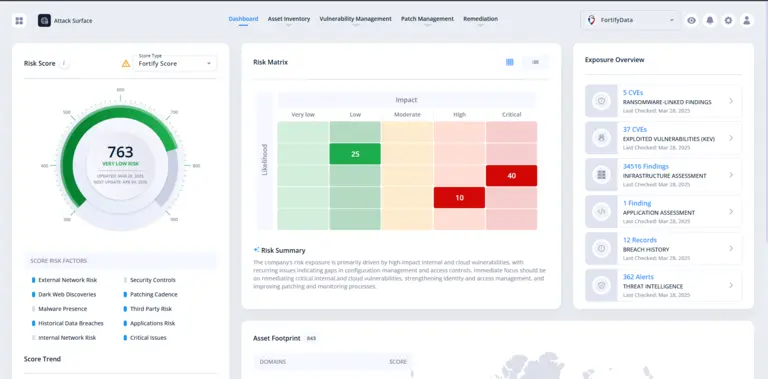
FortifyData dashboard 2026

Colleges and universities carry the same regulatory exposure as banks and hospitals, often with a fraction of the IT staff. You’re expected to secure student data, vet a growing list of vendors, and prove compliance with GLBA, FERPA, and sometimes HIPAA, usually without a dedicated security team to do it.

Most of the tools built for this problem were designed for institutions with the staff to run them: dedicated analysts for vendor review, a compliance team per framework, a security operations function watching the attack surface around the clock. Most colleges and universities don’t have that. They have one IT director covering all of it, or a small team splitting time between security, compliance, and everything else that keeps the campus running.

FortifyData gives higher education IT teams one platform to see their attack surface, manage vendor risk, and track compliance, built for institutions that need to cover a lot of ground without adding headcount. This isn’t about matching a large research university’s resources. It’s about making your existing team’s time go further, the same shift D’Youville University made when it moved from ad hoc spreadsheets to a structured program with a team of fewer than 20 IT professionals.

See What Your Team Doesn't Have Hours to Chase

Most college and university IT environments span more departments, systems, and vendors than a small team can manually track: financial aid systems, learning management platforms, research infrastructure, student portals, and whatever legacy tools got inherited from a merged or acquired program. None of that shrinks because your team is small. The exposure is the same as a much larger institution’s. The staff to watch it usually isn’t.

That gap between what needs watching and who’s available to watch it is exactly what leaves institutions running on an annual scan and hoping nothing changes in between. College of the Canyons felt this directly. Before FortifyData, the college ran on a single sys admin and an annual vulnerability scan.

“We kind of had a very ad hoc security process,” said Hsiawen Hull, Executive Director of Infrastructure and Information Security. “We did an annual vulnerability assessment and that was pretty much it. And that included internal and external scans and a list of things that you should fix.” FortifyData’s continuous, automated scanning replaced that once-a-year snapshot with an ongoing view, without adding staff. Weekly asset identification and scanning meant new systems, expired certificates, exposed ports, and emerging vulnerabilities surfaced as they appeared, not months later at the next scheduled review. “FortifyData has been instrumental in transforming our security posture from reactive to proactive,” Hull said. “The ability to move the needle and watch the needle actually move is really huge.”

Know what’s exposed before it’s exploited, not after an audit tells you

  • Scans the way an attacker would. Direct, non-intrusive scanning across your full surface (internal, external, cloud) produces a confirmed asset inventory, not an estimate built from the outside looking in.
  • Works with what you already run. The FortifyData Collector pulls in data from tools you’ve already invested in like Tenable Nessus, CrowdStrike, Microsoft Defender, SentinelOne; instead of asking you to rip and replace.
  • One prioritized list, not four disconnected ones. Direct scan findings, your existing tool data, hourly threat intelligence, and asset criticality context all feed a single remediation list, ranked by actual business risk, not by which tool happened to flag it.
  • Right-sized for teams outgrowing spreadsheets but not ready for enterprise cost. Moving off manual asset tracking shouldn’t mean jumping straight to enterprise pricing and complexity; FortifyData’s modular platform scales with the program you’re building, not the one a Fortune 500 already has.
FortifyData dashboard 2026

One capability particularly relevant to higher education: peer benchmarking. FortifyData lets institutions compare their cybersecurity risk posture against other colleges and universities, not just against a generic industry baseline. For IT leaders who need to answer “how are we doing compared to schools like us” in a board meeting or a cabinet update, that comparison is built into the platform, not something you have to piece together yourself from separate reports.

blank

Visibility only helps if you know what to act on first, and that’s often the harder problem for a small team. At Pima Community College, FortifyData didn’t just flag vulnerabilities, it showed which ones actually mattered. “It’s one thing to have a tool that gives you information that you do nothing with,” said Isaac Abbs, CIO at Pima Community College. “It’s a whole other thing to bring in a tool that gives you information that you can take immediate action on.”

By classifying assets by criticality and enriching findings with threat intelligence, FortifyData gave Pima’s team a prioritized list instead of an undifferentiated one, and the college raised its risk score 73% in under two months as a result.

Learn more about Attack Surface Management.

Know Your Vendor Risk Without Living in Questionnaires

Higher education runs on vendors: learning platforms, payment processors, cloud services, research partners, and dozens of smaller tools departments bring on independently, often without IT or security even being looped in until something breaks. Every one of them is a potential entry point into your environment, and most IT teams are working from a vendor list that’s incomplete before you even get to assessing risk.

The Higher Education Community Vendor Assessment Toolkit (HECVAT) is the standard your peer institutions already expect, but reviewing it manually doesn’t scale, especially when a single analyst is doing the reading. At Pima Community College, a single analyst spent 6 to 8 hours reviewing one vendor’s SOC 2 or HECVAT documentation, capping the team at roughly one review per day and consuming close to 10% of total team time. “This involved one analyst reviewing key points in the documentation to ensure the vendor met the minimum requirements to proceed,” said Lorenso Trevino, CISO and Director of Security at Pima Community College.

FortifyData’s AI Auditor reads vendor SOC 2 and HECVAT documentation directly, flags compliance gaps against the standard, and produces a structured summary for the team to validate, cutting Pima’s review time from 6 to 8 hours down to 1 to 2 hours per vendor. Trevino’s team cross-checked the AI’s early results against their own manual review before trusting it. “I am always skeptical of the results of AI,” Trevino said. “As such, we verified our first couple of reports with a separate, manual analysis.” The results held up, and the team’s time spent on vendor report review dropped from roughly 10% to under 2%. “The best part is that they can shift their focus to other tasks while the AI auditor is doing its documentation analysis,” Trevino said. “This is a big win for my team.”

FortifyData AI Auditor of SOC 2 and vendor reports dashboard image
  • Reviews vendor documentation at scale, not one report at a time. SOC 2 reports, HECVATs, compliance documentation, and questionnaire responses are ingested and analyzed against your organization’s chosen frameworks and risk methodology — automatically.
  • Every finding traces back to its source. The AI Auditor cites the original material behind every conclusion, so your team isn’t just getting an answer — they’re getting one they can defend to an auditor or regulator without re-reading the report themselves.
  • Less time per vendor, more confidence in the result. Faster assessments and dramatically reduced analyst time per vendor, without trading away the rigor a manual review would have caught.

Beyond the initial review, vendor risk isn’t static. D’Youville University uses FortifyData to track risk across its vendor ecosystem on an ongoing basis, with risk scores for its top vendors informing contract renewal and insurance decisions rather than sitting in a spreadsheet no one revisits until the next audit cycle.

The same peer-comparison capability that applies to your attack surface applies here too: seeing how a given vendor’s risk profile compares to others in the same industry, not just whether they passed your internal checklist. That context makes it easier to prioritize which vendor relationships actually need a closer look, and which ones can wait until the next review cycle.

Learn more about Third-Party Risk Management.

Compliance Management That Matches What Your Team Actually Has to Cover

Higher education compliance isn’t one framework, it’s several running at once: GLBA, FERPA, sometimes HIPAA, sometimes NIST 800-171 depending on federal funding or research contracts. Most institutions don’t have a compliance team large enough to manage each one as its own project, which usually means the frameworks get handled reactively, one audit or insurance renewal at a time.

GLBA and the FTC Safeguards Rule. Because higher education institutions handle federal financial aid, they’re treated as non-bank financial institutions under FTC jurisdiction and are subject to the GLBA Safeguards Rule, a security-specific, risk-assessment-driven program requirement (not the Interagency Guidelines that apply to banks). It requires more than a scanning tool; it requires a documented program of risk assessment, remediation, and proof that the remediation actually happened. College of the Canyons built exactly that with FortifyData, and independent audits found the college in compliance with all nine GLBA Safeguards Rule requirements. “Part of our requirements for GLBA and NIST is not just a scanning tool, but a program for risk assessment and vulnerability remediation,” said Hsiawen Hull. “So, we need to scan, remediate vulnerabilities, and then prove they are remediated. And that’s where FortifyData comes in.”

FERPA. Student records privacy is the compliance obligation every higher education IT leader already knows by name, and it carries real, ongoing enforcement scrutiny alongside GLBA, not behind it. FERPA governs how student education records are accessed, shared, and protected, and demonstrating that governance usually means being able to show, on request, exactly who has access to which systems and why. FortifyData helps institutions house and track the access-control policies and supporting evidence tied to FERPA-relevant systems, giving your team one place to document access controls instead of piecing that record together across IT ticketing systems, shared drives, and departmental spreadsheets when an auditor or a records request asks for it. FortifyData isn’t a FERPA compliance automation tool on its own, and it shouldn’t be mistaken for one. What it does is give you a defensible, current record of the access controls FERPA requires, integrated with the same platform tracking your other frameworks, instead of one more standalone process to maintain.

HIPAA, where it applies. Health professions programs, campus health centers, and student health services often bring HIPAA into scope alongside GLBA and FERPA, sometimes without a clear owner for coordinating across all three.

D’Youville University self-assessed against NIST 800-171, HIPAA, and GLBA on the FortifyData platform, replacing what had been separate, disconnected processes for each. “Usually, those three or four things aren’t in one platform,” said Kristin Benoodt, former Director of Networking and Security at D’Youville. “That was one of the biggest appeals of FortifyData, it delivered what others just claimed.” The university went on to develop an institution-wide HIPAA policy, not one limited to a single clinic or department, and used FortifyData’s task management to assign and track the evidence-gathering work behind it. “I really can’t say enough about the ability to assign tasks and have it complete in there,” Benoodt said. “I could just assign stuff and check the progress instead of constantly rehashing what we’re supposed to be working on or pulling up manual spreadsheets.” That same structure carried into board reporting, where Kristin and D’Youville’s CIO could show trustees exactly what frameworks were being followed and how much progress had been made. “With spreadsheets, we were constantly rehashing what needed to be done,” Benoodt said. “With FortifyData, everything was in one place, and the team knew exactly what we were working toward.”

Learn more about Compliance Management.

Built for Teams Who Don't Have Room for Another Standalone Tool

If your institution is managing attack surface, vendor risk, and compliance as three separate processes, with three sets of manual work behind them, that’s not a resourcing failure. It’s what happens when the tools available were built for institutions with bigger teams than yours.

FortifyData brings continuous visibility, vendor risk management, and compliance tracking into one platform, so your team can cover what a much larger institution would need a much larger staff to manage, and so the next board update, insurance renewal, or audit doesn’t mean starting from a spreadsheet.

Talk to a compliance specialist about what this looks like for your institution.

Frequently Asked Questions about Higher Education IT Risk Management and Compliance

What is IT risk management for higher education?

IT risk management for higher education is the ongoing process of identifying, assessing, and reducing cybersecurity risk across a college or university’s systems, vendors, and compliance obligations. For most institutions, that means covering attack surface visibility, third-party vendor risk, and regulatory compliance (GLBA, FERPA, and sometimes HIPAA) with a small IT or security team rather than a dedicated department for each.

Does GLBA apply to colleges and universities?

Yes. Because higher education institutions handle federal financial aid, they are treated as non-bank financial institutions under FTC jurisdiction and are subject to the GLBA Safeguards Rule. This requires a documented information security program, including risk assessment, safeguards, and evidence that remediation actually took place, not just an annual scan.

What is the difference between the GLBA Safeguards Rule and the Interagency Guidelines?

The Interagency Guidelines apply to banks and other institutions regulated by federal banking agencies. Colleges and universities fall under the FTC’s jurisdiction instead, which means they are held to the GLBA Safeguards Rule specifically. The two frameworks share the same underlying law but have different regulators, different specific requirements, and different audit expectations.

Does FERPA require specific IT security controls?

FERPA governs how student education records are accessed, shared, and protected, but it does not prescribe a specific technical security framework the way GLBA’s Safeguards Rule does. In practice, institutions still need to be able to show who has access to student records, how that access is controlled, and how it’s documented, especially in response to an audit, an incident, or a records request.

What is HECVAT and why does it matter for vendor risk?

HECVAT (the Higher Education Community Vendor Assessment Toolkit) is a standardized questionnaire higher education institutions use to assess the security posture of technology vendors. It’s widely recognized across the sector, which makes it the expected format for vendor risk assessments, but reviewing HECVAT responses manually is time-consuming, often taking hours per vendor for a small team.

Does HIPAA apply to colleges and universities?

HIPAA can apply to higher education institutions that operate health professions programs, campus health centers, or student health services handling protected health information. Many institutions manage HIPAA requirements alongside GLBA and FERPA rather than as a fully separate program, since they often affect overlapping systems and departments.

How can a small IT team manage GLBA, FERPA, and HIPAA at the same time?

Most small IT teams manage multiple compliance frameworks by consolidating evidence collection, access-control documentation, and risk assessment into a single system rather than running a separate manual process for each regulation. This reduces duplicate work across frameworks with overlapping requirements and makes it easier to produce audit-ready evidence without dedicating a full-time compliance role to each one.

What is peer benchmarking in cyber risk management?

Peer benchmarking compares an institution’s cyber risk posture or vendor risk profile against similar organizations, such as other colleges and universities, rather than against a generic industry average. For higher education IT leaders, this makes it easier to answer how the institution’s security program compares to peer schools when reporting to a cabinet or board of trustees.

Related Resources

E-Book: Six Steps to an Effective Third-Party Cyber Risk Management Program

FortifyData’s Cyber Risk Management Platform – Overview Video

Third Party Cyber Risk Management: Automating Product and Service Specific Assessments